LouiseLM
Chat with ACP Agents inside Neovim.
LouiseLM runs the Agent commands you configure and gives each one a streaming chat Session. Keep several Sessions open, attach editor context, review file edits and permissions, invoke Agent Skills, hand work to another Agent, and inspect raw tool activity or export the full transcript. Documented or tested paths include Codex, Claude, DeepSeek, OpenCode, and GitHub Copilot.
Try LouiseLM in your browser — no installation, Agent, Provider, credentials, or project files required. The guided Agent behavior is clearly labelled and scripted; the Neovim and LouiseLM UI are real.
Open the Tutor · Agents and adapters · Vim help · Headless API
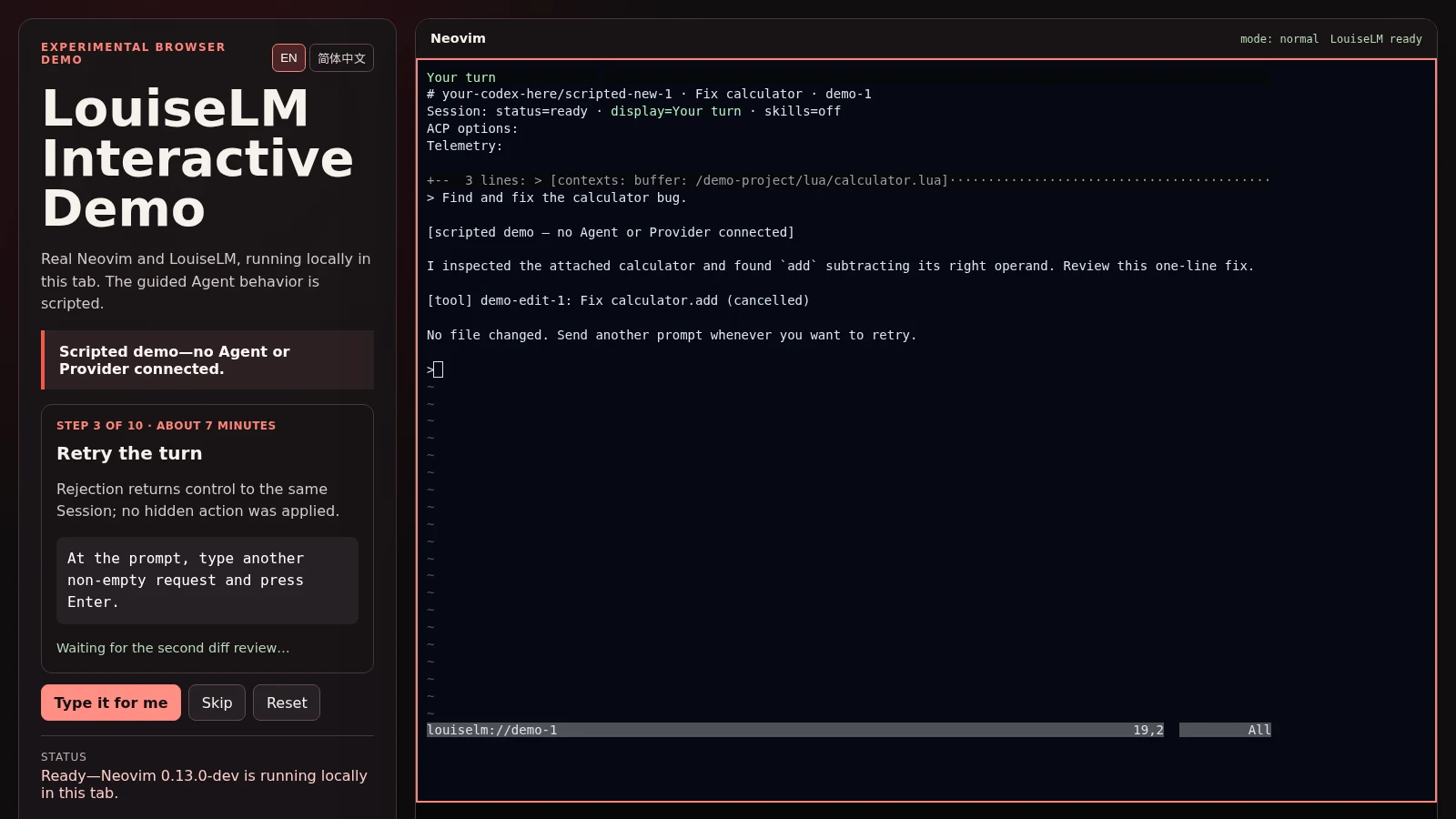
The left pane is the scripted browser guide; the right pane is LouiseLM’s real Neovim UI. No Agent or Provider is connected.
Start here
Already configured? Open the in-editor Tutor:
:LouiselmTutorThe Tutor works even before an Agent is ready. It walks through the health check, a first prompt, permissions, context, cancellation, and Session controls.
For a first chat you need one installed and authenticated ACP Agent. Codex is
the shortest documented path; install codex-acp using its
official instructions.
Install sqlite3 3.38 or newer with JSON support on PATH (for example,
sudo apt install sqlite3 on Debian/Ubuntu). Every Session records private
turn metadata before sending a prompt. Recording failures hold new prompts;
active work can finish. See durable turn recording
for storage, recovery, and the asynchronous headless API contract.
Shared state defaults to ~/.local/state/louiselm/ ($XDG_STATE_HOME/louiselm/
when set), independently of the Neovim profile.
The source is public, and the first alpha release is available as
plugin-v0.1.0. Exact plugin pins are described in the
release guide.
Core chat requires no capture, trusted-tool or Android companion. If you have a checkout,
replace the path below and save this as quickstart.lua:
vim.opt.runtimepath:prepend("/absolute/path/to/louiselm")

assert(require("louiselm").setup({
  agents = {
    codex = { command = "codex-acp", provider = "OpenAI" },
  },
}))
Start an isolated Neovim, then check the setup and chat:
nvim --clean -u quickstart.lua:checkhealth louiselm
:LouiselmTutor
:LouiselmChatThe quickstart does not modify your normal Neovim configuration. Move the same setup block into your regular configuration when ready, or see the Agent table for other paths.
Direct Agent commands, including wrappers, have no LouiseLM Verified posture.
For an explicit prospective artifact snapshot, use
:LouiselmPreflight request.json manifest.json with skills.management.enabled = true
and louiselm-skills on PATH.
It reads asynchronously and opens health; it does not authorize or start an Agent.
See artifact preflight
for the input contract, prior comparison and evidence limits.
Optional integrations default to disabled. Run :checkhealth louiselm to discover
the exact opt-ins for Attention, Beads, capture, workflow Runs, skill invocation
and trusted skill management, plus their manual setup instructions. Availability
never enables a feature. See :help louiselm-optional-capabilities; service-owned
receiver, transcription and push choices are independent of editor settings.
Every Agent must declare its access/quota provider, independently of the Model
manufacturer: a Model reached through GitHub Copilot has Provider GitHub Copilot.
For an Agent whose advertised option values identify services by namespace,
configure a literal prefix map (the option ID need not be model):
provider = {
  option = "model",
  prefixes = {
    ["opencode-go/"] = "OpenCode Go",
    ["opencode/"] = "OpenCode Zen",
    ["deepseek/"] = "DeepSeek",
  },
}
These mappings are explicit configuration, not built-in Agent-specific rules. New Models under a configured prefix need no config edit. Prefixes are nonempty, literal and case-sensitive: no patterns or longest-match precedence. Missing or non-string option values, no match, and multiple matches refuse attribution; even overlapping prefixes naming the same service are ambiguous.
When attribution depends on multiple options or exact values, use routes instead:
provider = {
  { provider = "OpenAI", options = { model = "openai/example-model" } },
  { provider = "GitHub Copilot", options = { model = "github-copilot/example-model" } },
}
Use the option IDs and values your Agent actually advertises, and map the service
supplying your access. All entries in a route’s options must match, including
boolean values. Exactly one route or prefix must match before either Chat or the
headless Session API sends a prompt. Missing configuration fails setup; missing or
ambiguous active routes leave the Session ready and report how to fix attribution.
Session:inspect().turn_identity preserves Agent, Provider, advertised Model,
and the complete supported option tuple at prompt start; later option changes
do not rewrite it. Durable turn recording preserves this attribution with usage history.
Features
Chat in Neovim. Stream replies, reasoning when supplied, tool activity, context usage, and cost when the Agent reports them. Account limits are adapter-dependent: stock adapters generally do not advertise the required extension. See Account limits support. Agents supporting experimental ACP compaction updates also provide timeline status and optional retained summaries; inspect a compaction row with
:LouiselmInspectTool. Support depends on protocol events, not Agent names.Use several Agents and Sessions. Create, switch, rename, and close independent Sessions. Resume history when the Agent supports ACP Session discovery and loading. With at least two Agents configured, a reviewed Handoff opens a separate Session while preserving the source Session. It reuses the latest usable completed compaction summary with recent conversation when available, or falls back to the filtered full transcript. You review the context and supply the takeover task before sending; the source Agent is never asked for another turn to prepare the Handoff.
Send editor context. Queue the current buffer, a file, a Visual selection, or diagnostics for the next prompt.
:LouiselmInlinereplaces a selection as the response streams.Control side effects. Permission requests require a human decision by default. Review proposed file edits in a diff when the Agent supplies one. Remembered decisions stay scoped to the Agent command and workspace, and
:LouiselmCancelstops only the current turn.Inspect the work. Inspect raw tool payloads and Beads issues, browse commit/issue/Session Provenance, export the full transcript to Markdown, copy the Agent-scoped Session ID, and inspect supported account limits. Known Agent transcript layouts are supported; raw ACP logs remain adapter-owned. The Beads inspector shows the assignee (or unassigned), dependencies, dependents, and comments with their author and timestamp. It wraps text and grows to fit, up to the available editor height; longer issues scroll inside the float.
Keep diagnostic evidence. Private Forensics records preserve a bounded snapshot of Session configuration, capabilities, and Git state for later inspection.
:LouiselmForensicscovers the current Session; naming an Agent and ACP Session ID diagnoses any live Session, including one whose own chat is the thing that broke.:LouiselmForensicsViewreads a record back as plain text, showing which evidence is still readable and which is gone. Evidence export creates a bounded, redacted artifact from selected observations or JSONL ranges for sharing.Use Agent Skills. Discover and pick local skills, delegate to an Agent’s native skill support, inject a bounded catalog, or turn skill automation off per Agent.
Track Attention and Park work. The optional capture service stores current typed conditions such as ready turns, permission requests, failures, and Parks. With
br, a Beads workspace, and the capture service, cold-Park eligible Runs and reconstruct them later through ACPsession/load; recovery is not lossless. After a receiver restart, the next Park or ResumePark action reconnects and reads fresh Run state; Neovim need not be restarted.Capture speech. Optional desktop commands record durable local audio and manage transcription. The source-built Android companion records offline, uploads later to a paired private receiver, and shows a read-only Attention inbox.
Build on the headless API. The same Agent configuration, Session lifecycle, permission policies, and typed events are available without the chat buffer.
The chat winbar shows turn state, a useful Session name, Agent, and current
Model and effort while you scroll. The example below includes Account limits
from an adapter advertising the extension; Agents without support, including
the stock Codex quickstart, show limits n/a:
Your turn · Review · codex · limits 98%/7d ↻7d · GPT-6 e=high +2 · ctx 53%+N counts hidden options, including model or effort when they no longer fit.
The options block folds to opts in narrow windows; Agents without supported
options have no block. Click the whole block or use :LouiselmSessionOptions
(<leader>lso) to inspect every value. During a response the overview is
read-only; changes require an idle Session. Summaries reflect current settings,
with no comparison to defaults or the start of the Session.
Context percentage (including stale indication) and cost follow those fields.
Full ACP identity and raw telemetry remain in the transcript header. Redundant
default quota labels are omitted; distinct quota buckets keep their names.
The neutral limits n/a marker is clickable: it opens the same inspector as
:LouiselmLimits, which explains when an Agent does not advertise support.
Agents not yet observed have no limits marker; their inspector explains that
a Session must first be started to check support.
As windows narrow, cost and context disappear, then effort and model fold,
then limits, Agent, and name give way. At extreme widths even opts yields to
turn state. Background attention has reserved space before optional detail.
Background Sessions that do not fit collapse into counts with the same status
colors and glyphs: blue +2… for two working Sessions, yellow +1● for an unseen
completed response, and green +1● for a ready Session already seen. Permission
requests and errors keep their labelled entries. Click any count to open the
Session picker, or use :LouiselmSessionSwitch. Counts update as Sessions change
state and when windows resize.
The Session picker aligns fields in columns, leaving blank cells for missing names or metadata. Agent and options precede the full Agent/ACP Session ID. Effort aligns by its ACP category; model settings such as Fast mode align by label. Ambiguous matches retain separate columns so no option disappears. Rows are a snapshot; reopen the picker to refresh their values and column widths.
:LouiselmSessionRename changes the human-readable name (Review above).
session-7 is an internal handle and the initial default name; it stays stable
after renaming. codex/<uuid> identifies the Agent conversation and can be
copied with :LouiselmSessionId. The statusline’s louiselm://session-7 is a
virtual buffer name, with Neovim filetype louiselm-session, rather than a file
on disk. The transcript heading includes these diagnostic identifiers; the
winbar omits names that merely repeat an identifier.
The complete command list is in :help louiselm. Common
entry points are grouped by purpose:
Sessions:
:LouiselmSessionNew,:LouiselmSessionSwitch,:LouiselmHandOff,:LouiselmResume.Context and control:
:LouiselmPickFile,:LouiselmPickSkill,:LouiselmPermissions,:LouiselmCancel.Inspection:
:LouiselmInspectTool,:LouiselmInspectProvenance,:LouiselmToMarkdown,:LouiselmForensics.Optional capture and Park:
:LouiselmCapture,:LouiselmCaptureInbox,:LouiselmPark,:LouiselmResumePark.
Agents and adapters
LouiseLM starts named stdio ACP commands; the UI is not tied to one Provider or Model. Configure several commands at once and choose an Agent when creating a Session. Capabilities and authentication still depend on each Agent.
| Agent | ACP entrypoint | Setup support |
|---|---|---|
| Codex | codex-acp | Documented recipe and local quickstart profile |
| Claude Agent ACP | claude-agent-acp | Documented API-key recipe |
DeepSeek through acp-llm-adapter | acp-llm-adapter serve --backend deepseek | Documented recipe |
| Google Antigravity | agy_acp_server.par --uid= (Linux) | Official ACP server; documented setup recipe |
| OpenCode | opencode acp | Captured ACP behavior; use upstream setup |
| GitHub Copilot CLI | copilot --acp --stdio | Tested transcript layout; use upstream setup |
The table links to each upstream installation source. LouiseLM gives stdio ACP
commands the same command, args, and env configuration shape; that does
not imply identical capabilities across Agents.
Account limits require the accountLimits v1 ACP extension. The maintainer’s patched Codex and Claude adapters emit it; the stock adapters linked above do not provide those patches. The Codex fork and Claude fork are unsupported reference implementations, with no compatibility promise or supported distribution. A separate local Copilot adapter also emits the extension but is not published; it is not the stock Copilot CLI listed above. OpenCode does not emit it, and Account limits support has not been established for the listed DeepSeek or Antigravity entrypoints. Without the extension, LouiseLM reports Account limits as unsupported; ordinary chat remains available.
Optional components
capture-service/README.md: local recording storage, transcription state, Android pairing, Attention, and cold-Parked Run records.android/README.md: an offline-first recorder and read-only Attention inbox, not a mobile chat or workflow-control app.skills-core/README.md: experimental, source-built immutable skill packages, deterministic Inspection, reviewer Dossiers, and Skill Admission. Root-owned installation and protected trust have passed release acceptance in a disposable VM; desktop deployment and end-to-end Verified Session cutover remain pending. This is separate from ordinary chat skill discovery and does not decide whether a skill is safe.
Scope
The features above exist today. LouiseLM does not claim to turn every idea into a finished result, autonomously triage a backlog, or execute an entire task graph without operator decisions.
Documentation and development
Tutor: the short first-use tour available through
:LouiselmTutor.Vim help: generated commands and configuration reference.
API appendix: headless Session API and public Lua types.
Example workflow: the maintainer’s configuration, not a product contract.
ACP log backups: opt-in encrypted snapshots, cloud copy, staged restore and reviewed retention. The maintainer accepted scheduled local/cloud recovery on 2026-09-10; new installations remain opt-in, and retention remains manually reviewed.
Contributing and
AGENTS.md: project policy and quality gates.
Build the checked documentation site with npm ci && npm run site:build.
Local builds must set LOUISELM_DEMO_PACKAGE_TOKEN to a GitLab token with
package-read access; CI uses its same-project job token.
License and project policies
LouiseLM is available under the MIT License. Use of its name and marks is covered by the trademark policy. The project’s political position is documented separately in the political statement.